





Open RAR, 7Z, ISO, ZIP, ZIPX and many other files with ease
Need help opening RAR and ZIP files? BitZipper is a data compression tool for Windows that enables you to open 47 different compression and encoding formats with superior ease-of-use. Read more below.
|
10 good reasons to get BitZipper today
|
|
New to data compression, ZIP and RAR files?A ZIP or RAR file is a collection of documents, movies, programs or other files that have been reduced in size (compressed) and stored together in a single archive file. To access the original files inside an archive file (to "unzip" or "extract" them), you need a tool like BitZipper. Want to learn more about compressed files?
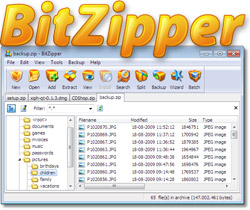
If you have downloaded or received a compressed file of a certain type and want to learn more about it, read on. BitZipper will open all of these files and create several of them too. Click the file type to learn more about it: Think working with compressed files is hard?A visual step by step guide showing you how to open a RAR file and other compressed files is available here. It's really quite simple! Need more than just opening ZIP and RAR files?BitZipper will open almost any compressed file you will ever come across, but it does much more than that. Powerful built-in file viewerWhen you open files with BitZipper, you can view the content directly from within BitZipper using a powerful built-in file viewer. It can view text files and almost any picture file format, including BMP, BW, CEL, CUT, DIB, EMF, EPS, FAX, GIF, ICB, ICO, JFIF, JPE, JPEG, JPG, PBM, PCC, PCD, PCX, PGM, PIC, PNG, PPD, PPM, PSD, PSP, RGB, RGBA, RLA, RLE, RPF, SCR, SGI, TGA, TIF, TIFF, VDA, VST, WIN and WMF. Protects your sensitive dataEncrypt your data and protect it from prying eyes. BitZipper supports strong AES encryption which is an encryption standard endorsed by the NSA. Enter a password when creating your ZIP file and BitZipper will apply strong encryption to your files and keep them safe. One tool for everybodyBitZipper comes with 4 interfaces, satisfying both new users and power users. It has a very friendly Wizard interface for new users, a Windows Explorer-style (Classic) interface for experts, a batch (bulk) processing interface for power downloaders and an interface accessible directly from Windows Explorer. Backup to standard ZIP formatUse Backup Sets (archive templates) to define which files and folders to back up, and activate your backup by the click of a button. Your backed up files can be accessed by BitZipper or any other tool capable of reading standard ZIP files. Many handy features
Working with compressed files should be no more difficult than working with your
web browser or word processor. In BitZipper you will find handy features like
multiple open archives, searching for files in archives and export of the archive
content list to Word, Excel, text or HTML format - features you will not find in
the average ZIP tool.
|
|